

IPTV Smarters Pro is one of the most popular IPTV players in 2026, allowing users to stream live TV, movies, and series using their IPTV subscription. It supports Xtream Codes API, M3U playlists, and multi-device compatibility, making it a top choice worldwide.
👉 Important: IPTV Smarters Pro does NOT include channels. You must have an active IPTV subscription.
🔥 Features of IPTV Smarters Pro
- Supports Xtream Codes & M3U URL
- Multi-screen & multi-user support
- Built-in powerful video player
- EPG (TV Guide) support
- Parental controls
- Compatible with all major devices
📺 How to Install IPTV Smarters Pro on Firestick / Android TV (2026)
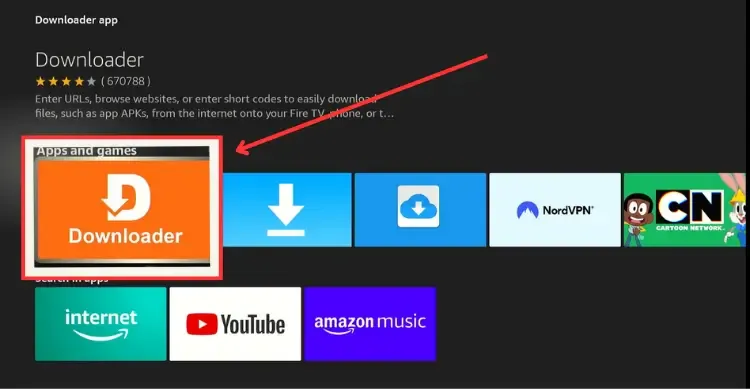
Step 1: Install Downloader App
- Go to Search on your device
- Type Downloader
- Install and open it
Step 2: Enable Unknown Sources
- Go to Settings > My Fire TV > Developer Options
- Enable Install Unknown Apps
- Turn ON for Downloader
Step 3: Install IPTV Smarters Pro
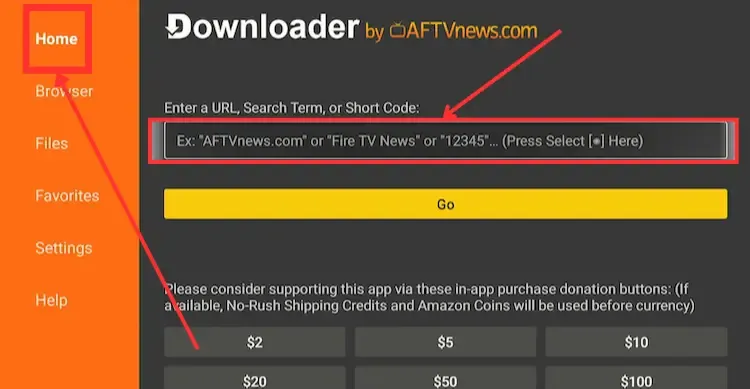
- Open Downloader
- Enter code: 6468112
- Click Go
- Wait for download
- Click Install
- Open the app
📱 How to Install on Android Phone / Tablet
👉 Download APK: https://www.iptvsmarters.com/iptv-smarters-5.0.apk
Steps:
- Click the download link above
- Open the APK file
- Allow Unknown Sources
- Tap Install
- Launch the app
🍎 How to Install on iPhone / iPad
👉 Download from App Store: https://apps.apple.com/us/app/smarters-player-lite/id1628995509
Steps:
- Open the App Store link above
- Install Smarters Player Lite
- Open the app
- Accept terms and continue
💻 How to Install on Windows PC
👉 Download for Windows: https://www.iptvsmarters.com/download/?download=windows_app
Steps:
- Download the Windows setup file
- Open the installer
- Complete installation
- Launch the app
🍏 How to Install on MacBook
👉 Download for Mac: https://www.iptvsmarters.com/download/?download=mac
Steps:
- Download the Mac file
- Open installer
- Drag to Applications
- Launch IPTV Smarters
⚙️ How to Setup IPTV Smarters Pro (VERY IMPORTANT)
After installing IPTV Smarters Pro, follow these steps:
Step 1: Open App
- Launch the app
- Select TV or Mobile layout
🔑 Setup Using Xtream Codes (Recommended)
If you don’t have Subscription yet click here to get Free Trial
Enter the following:
- Username: Provided by your IPTV provider
- Password: Provided by your IPTV provider
- Server URL: Provided by your IPTV provider
Click Add User
🔗 Setup Using M3U URL
- Select Load Your Playlist / File URL
- Enter:
- Playlist Name
- M3U URL
- Click Add User
📡 Final Step: Start Watching
- Wait for channels to load
- Open Live TV / Movies / Series
- Enjoy streaming
⚠️ Tips for Best Performance (2026)
- Use internet speed of at least 20 Mbps
- Restart app if buffering
- Always use latest version
- Clear cache regularly
❓ Common Issues & Fix
App Not Installing?
- Enable Unknown Sources
- Check device storage
Buffering Issues?
- Use stable internet
- Restart router
- Try VPN if needed
Login Not Working?
- Double-check credentials
- Prefer Xtream Codes login
✅ Conclusion
Installing IPTV Smarters Pro in 2026 is simple and works across all devices.
Using the Downloader code 6468112 makes installation on Firestick and Android TV fast and easy. Once installed, just enter your IPTV details and start streaming instantly.
