

⚠ Temporary Notice: Our official Xtreme HD IPTV app is currently not working for new users.
iPhone users can use a compatible IPTV player app like IPTV Smarters Pro as an alternative until our official app is restored.
This guide will show you step-by-step how to install and configure Xtreme HD IPTV on your iPhone using either Xtream Codes API or M3U Playlist.
✅ What You Need Before Starting
- iPhone (iOS 15 or newer recommended)
- Active Xtreme HD IPTV subscription (provided by us)
- Login details:
- Username
- Password
- Server URL
OR - M3U Playlist link
- Stable internet connection (WiFi or 5G)
📥 Step 1 – Install IPTV Smarters Pro on iPhone
- Open the App Store
- Search for IPTV Smarters Pro
- Download and install the app
- Open the app after installation
Direct Download Link is here For IPhone
🔑 Step 2 – Add Your IPTV Subscription
When you open the app for the first time:
- Accept the terms & conditions
- Tap Add New User
- Choose your preferred login method
You will see two options:
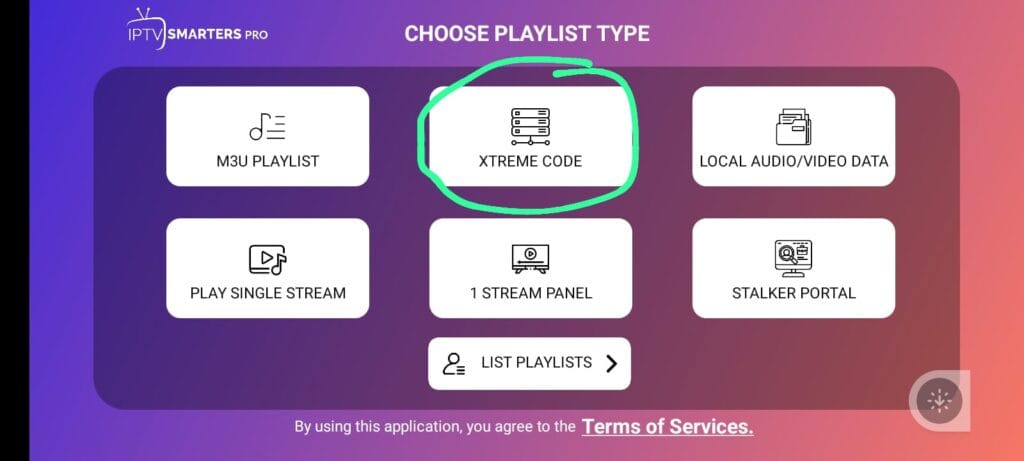
OPTION 1: Login with Xtream Codes (Recommended)
This is the easiest and most stable setup method.
- Select Login with Xtream Codes API
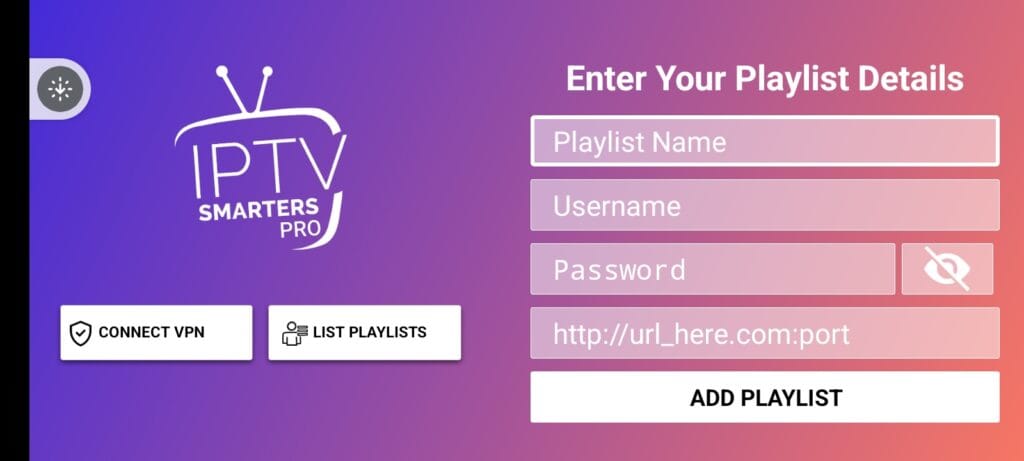
- Enter:
- Any Name (example: Xtreme HD)
- Username (provided by us)
- Password (provided by us)
- Server URL (provided by us)
- Tap Add Playlist
- Wait for channels, movies, and series to load
✅ Advantages:
- Quick setup
- Automatic TV Guide (EPG)
- Better stability
- No long URL typing
We highly recommend this method.
OPTION 2: Setup Using M3U Playlist
If you prefer M3U:
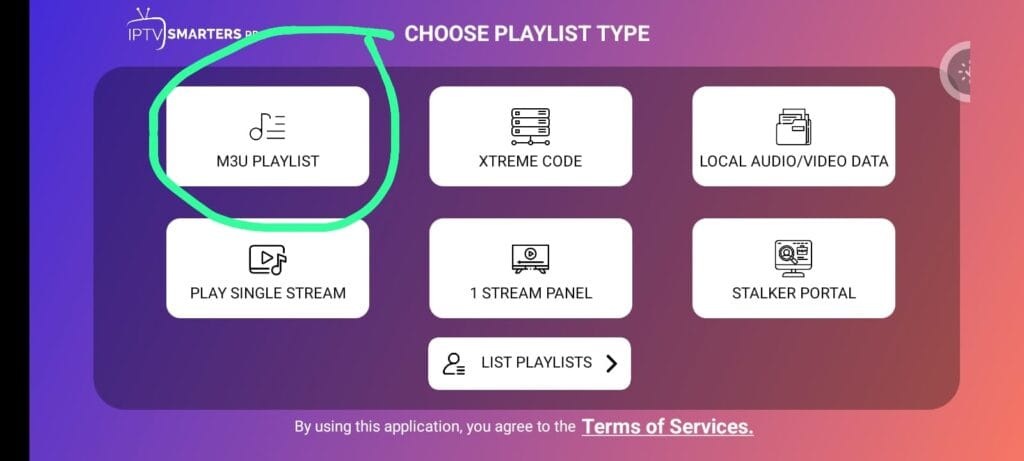
- Select Load Your Playlist or File/URL
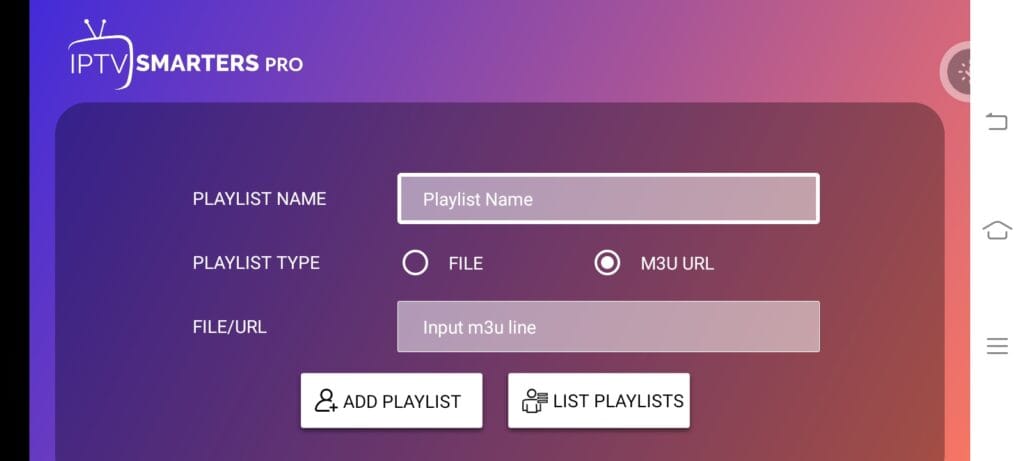
- Choose M3U URL
- Enter:
- Playlist Name (any name)
- M3U URL (provided by us)
- Click Add PLaylsit
- Wait for playlist to load
⚠ Note:
M3U links are long and can cause typing mistakes. Make sure there are no extra spaces.
📺 After Login – How to Use
Once your account loads, you will see:
- 📡 Live TV
- 🎬 Movies (VOD)
- 📂 Series
- 📅 TV Guide (if included)
You can:
- Add channels to Favorites
- Search channels
- Change video player settings
- Adjust streaming format if needed
🚀 Common Issues & Quick Fixes
❌ Invalid Login
- Double-check username & password
- Make sure Server URL starts with http:// or https://
- Avoid extra spaces
⏳ Buffering Issues
- Switch between WiFi and Mobile Data
- Restart the app
- Restart your router
📱 App Crashing
- Update the app from App Store
- Reinstall the app
- Restart your iPhone
🔐 Important Information
- IPTV Smarters Pro is only a media player.
- It does not provide channels by itself.
- An active Xtreme HD IPTV subscription from us is required.
🎯 Final Summary
For iPhone users in 2026, the best and easiest way to use Xtreme HD IPTV is:
👉 Install IPTV Smarters Pro
👉 Login using Xtream Codes API
👉 Start streaming instantly
If you need your login details again or face any issue, contact our support team and we will assist you quickly.
